Beyond Your Watchlist
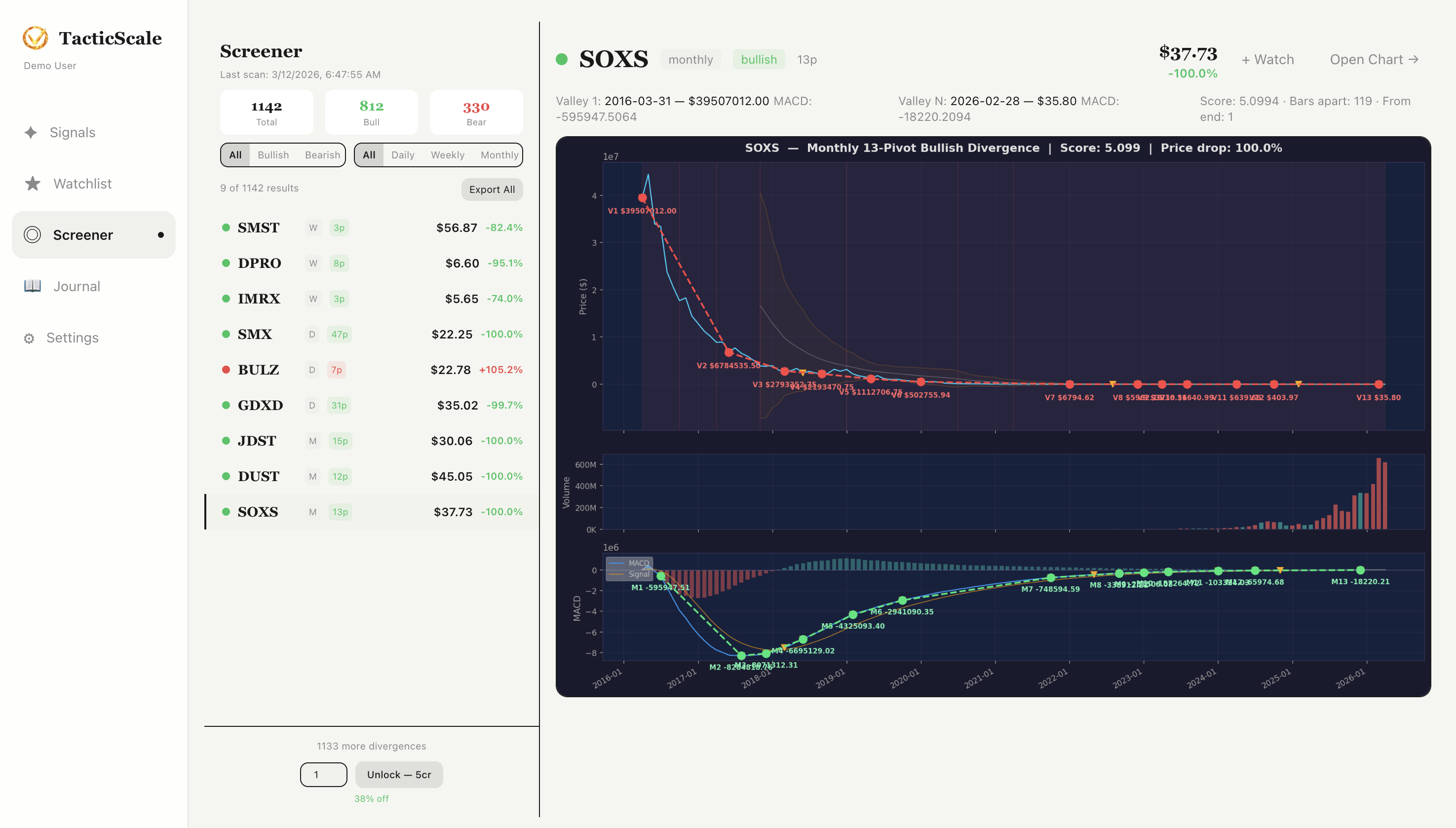
The Signals page scans your personal watchlist. The Screener goes much wider — it scans thousands of stocks and ETFs across the market for divergence signals. This is how you discover opportunities in tickers you weren't even watching.
Summary Bar
At the top, three numbers tell you the scale of what's been found:
- Total — the total number of divergence signals detected across all scanned stocks (e.g., 1,142)
- Bull — how many are bullish divergence signals (e.g., 812)
- Bear — how many are bearish divergence signals (e.g., 330)
These numbers update with each scan and give you a quick read on whether the market overall is showing more bullish or bearish divergence activity.
Filters
Below the summary, two rows of filter buttons let you narrow results:
- Direction filters: All, Bullish, Bearish — show only the signal type you're interested in
- Timeframe filters: All, Daily, Weekly, Monthly — focus on divergences at your preferred time horizon
The result count updates instantly as you toggle filters. In the screenshot, all filters are active showing the full 1,142 results.
Results List
The left panel shows the filtered results as a scrollable list. Each entry displays:
- Signal indicator — a colored dot (green for bullish, red for bearish)
- Ticker — the stock symbol
- Timeframe badge — which timeframe the divergence was found on (e.g., W for weekly, M for monthly)
- Number badge — how many divergence pivots are involved
- Price — current stock price
- Price change — percentage change, showing how much the stock has moved (large moves often accompany strong divergences)
Click any result to load its detailed divergence chart on the right. You can also "Export All" to download the full results list, or paginate through results at the bottom.
Divergence Detail Chart
When you click a result, the right panel shows a detailed divergence visualization. This is different from the regular chart page — it's specifically designed to show the divergence pattern:
- Price chart — with the divergence trendline drawn between the pivot valleys or peaks, annotated with exact prices and dates
- Valley/Peak annotations — labeled markers (V1, V2, etc.) showing each pivot point in the divergence sequence, with connecting lines showing the divergence angle
- MACD overlay — the MACD chart below with its own divergence trendline, making it visually clear how price moved one direction while momentum moved the other
- Score and metadata — at the top, you see the divergence score, number of bars apart, and price drop/gain percentage
Reading the Divergence Chart
In the screenshot, SOXS shows a Monthly 13-Pivot Bullish Divergence with a score of 5.099 and a 100% price drop. The price chart shows a clear downtrend with labeled valleys (V1 through V13), while the MACD histogram below shows momentum slowly climbing — a classic bullish divergence pattern where price makes lower lows but momentum makes higher lows, suggesting the downtrend may be losing steam.
From Screener to Action
When you find an interesting signal in the screener, click "Open Chart" in the top-right corner of the detail panel. This takes you to the full chart analysis page where you can:
- Examine the candlestick chart with all timeframes
- Check the Trade Score and Key Stats
- Use AI-powered digests for deeper analysis
- Add the ticker to your watchlist for ongoing monitoring
- Save it to your journal if you decide to trade it
The Workflow
- Step 1: Open the Screener page to see the latest scan results.
- Step 2: Use direction and timeframe filters to match your trading style.
- Step 3: Scroll the results list — stocks with the largest price changes often have the most dramatic setups.
- Step 4: Click a result to view the detailed divergence chart. Read the valley annotations and MACD divergence lines.
- Step 5: If the setup looks promising, click "Open Chart" for full analysis with AI insights.
- Step 6: Add compelling tickers to your watchlist to track them going forward.
Discover New Opportunities
Scan thousands of stocks and ETFs for divergence signals you'd miss on your own.
Launch TacticScale